Position Size Calculator
Estimate stock shares or spot-crypto quantity from your account, risk rule, entry, and stop before you trade.
Calculate, then journal it freeFree to calculate. No account required for the tool.
Free position size calculator for stocks and spot crypto
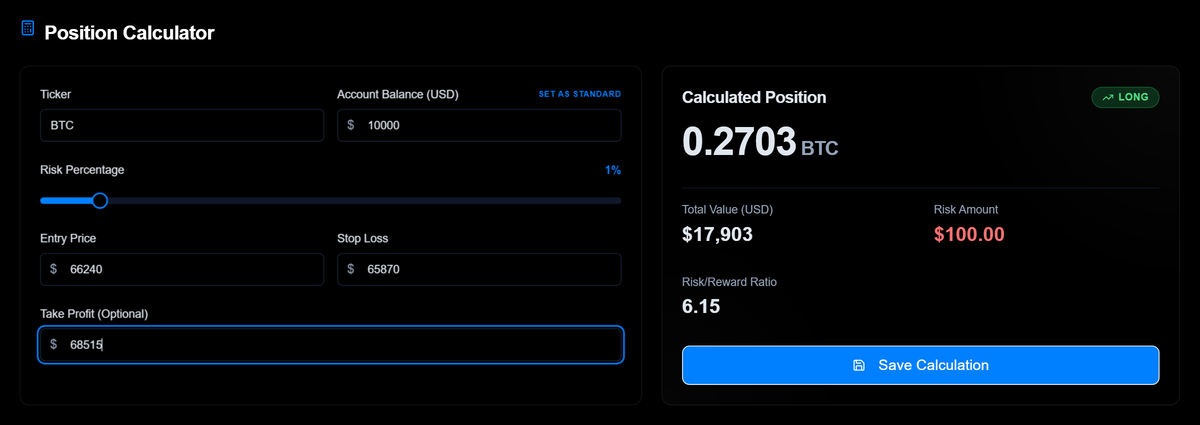
Choose stocks or crypto, then enter account balance, risk percentage, entry price, and stop loss. Madlytics estimates the trade size, planned dollar risk, position value, and risk/reward ratio when you add a take-profit price.
Short answer: position size = account balance x risk percentage, divided by the entry-to-stop distance. A $10,000 account risking 1% has $100 planned risk. With a $2 stop distance, that creates a 50-unit position. Madlytics calculates whole shares for stocks and quantity for spot crypto so the trade can be planned before it reaches your journal.
Methodology, assumptions, and limitations
Reviewed July 22, 2026. This is a mathematical estimator, not a trade recommendation.
Method: planned dollar risk = account balance x risk percentage. Estimated position size = planned dollar risk / absolute entry-to-stop distance. Inputs and outputs are treated as USD values. Stocks are rounded down to whole shares; spot crypto is returned in units. The result assumes a stop fills at the price entered.
The estimate does not include commissions, fees, slippage, gaps, liquidity, margin or borrow rules, broker limits, or tax effects. It is not designed for options, futures, or forex pip and contract sizing. Confirm instrument and broker rules before placing a trade.
Educational sources: CME Group on proper position size and CFTC on virtual-currency risk.
How the position size formula works
Position size = (account balance x risk %) / (entry price - stop-loss price)
Use the absolute distance between entry and stop. Direction does not change the formula; long and short trades both use the same planned-risk logic.
- 1. Calculate risk amount. Multiply account balance by the risk percentage you want to model.
- 2. Measure stop distance. Use the absolute difference between entry price and stop-loss price.
- 3. Divide risk by distance. The result is the estimated position size for the market you selected.
Worked examples: stocks and spot crypto
The same risk-budget logic works across markets, but the result should use the language of the market: whole shares for stocks and coin quantity for spot crypto. These are planning examples, not trade recommendations.
Stocks: shares per trade
$10,000 account, 1% risk, stock entry at $50, stop at $48.
Shares = risk amount / (entry - stop)
$100 planned risk / $2 risk per share = 50 shares.
Round share count down if rounding up would push the trade above the planned risk.
Crypto: coin quantity
$10,000 account, 1% risk, BTC entry at $30,000, stop at $29,400.
Coins = risk amount / (entry - stop)
$100 planned risk / $600 stop distance = 0.1667 BTC.
If the stop gets wider, the coin quantity should get smaller if planned risk stays the same.
Crypto position size calculator for spot trades
Crypto volatility can make the stop distance change quickly. If the stop gets wider and planned dollar risk stays the same, the coin quantity should usually get smaller.
The calculator makes that adjustment visible before entry, so the trade size is not chosen from rough mental math while the market is moving.
Risk and reward: sizing for R:R
Take-profit is optional, but adding it lets the calculator show the planned risk/reward ratio. That is useful context when you later compare the trade plan against the actual outcome.
Before you save the calculation
- Recalculate if the stop changes before entry.
- Do not round the size up if it pushes planned risk above the rule.
- Save the planned size, risk amount, and stop distance with the trade record.
- Review later whether actual risk matched the planned risk.
Why position sizing matters before every trade
The formula is simple. The discipline is doing it from the actual stop level before every entry. If position size gets rounded up while the stop gets wider, the trade can carry more risk than planned.
If your position size changes randomly, your trade review becomes harder to trust. Consistent sizing, tracked in a free trading journal, makes it easier to see whether risk stayed inside the plan.
Bridge the calculator to the full review path
The calculator answers the pre-trade size question. The supporting pages explain what to do before and after that calculation so the number becomes part of a repeatable trading workflow.
Understand the trading risk workflow
Use this when you need the broader process: define risk first, size the position, then review whether the plan held.
Risk management guide ->Connect planned risk to the journal
Use this after the calculation so the planned size, stop, risk amount, and outcome stay attached to the trade record.
Trading journal workflow ->Review whether sizing stayed consistent
Use this after the trade closes to compare planned risk with actual size, stop placement, and exit behavior.
Post-trade review checklist ->Compare journals for risk review
Use this when choosing a journal that can keep position sizing, notes, screenshots, tags, and analytics in one review path.
Best trading journal criteria ->Connect the calculation to trade review
A calculator is most useful when the planned size, stop, risk amount, and outcome stay connected. Madlytics lets you calculate before entry, then review the trade with notes, screenshots, tags, risk context, and analytics in the same workflow.
Insight
Position size is one of the easiest risk mistakes to miss.
A trade entered at the wrong size does not look different on the chart. The difference shows up when the result is recorded and the risk no longer matches the plan.
Scenario
A simple volatility sizing example
Imagine a trader with a $15,000 account and a 1.5% risk rule. The intended risk per trade is $225. If volatility widens the stop distance, the position size needs to get smaller to keep the same dollar risk.
If the trader keeps using a round number without recalculating from the actual stop level, the risk can drift above the plan. Reviewed in a trading journal afterward, the issue is no longer only the losing trade. It is the gap between intended risk and actual risk.
Log the calculation in your free trading journal
Madlytics does not tell you which trades to take. It helps you calculate planned size, record the setup, and review whether risk stayed inside the plan after the trade closes.
Frequently asked questions
What is a position size calculator?
Which tools help active traders with position size calculation?
How do I calculate position size?
How do I size a crypto position?
What risk percentage should I use per trade?
What should active traders know about position sizing strategy?
What is the position sizing formula?
Is the Madlytics position size calculator free?
Does this calculator give financial advice?
Related resources
- Free trading journal - track whether you're sizing consistently ->
- Risk management in trading - the framework behind position sizing ->
- Best trading journal - choose a review workflow for risk consistency ->
- Post-trade review checklist - review whether planned risk was followed ->
- Trading journal template - fields to track planned risk ->
Size the trade before you enter it
Use the calculator before entry, then use Madlytics to review planned risk, actual risk, and trade outcomes in one workflow.